JDOT #3: Vibe Coding, TDAID, and My AI Stack

March 25, 2025
Tags:
I share Gmail Signature Rotator, Test-Driven AI Development, the AI tools I pay for, and a comparison of image generators.


Well, it’s been another eventful week in AI. Before we begin, thanks to all the new subscribers. I can't believe it took only two editions to break 1000 subs.
In this third edition, I will share:
- A vibe-coded Chrome extension I developed and open sourced specifically for this newsletter
- A new approach I stumbled upon to improve vibe-coding using TDD (Test-driven development) called TD-AID (Test-Driven AI Development)
- A variety of thoughts on this week’s AI news. There’s so much happening that if I covered every story I bookmarked, this newsletter would be five times longer.
🎶👨💻 Vibe Coding
Introducing and open sourcing a Chrome Extension called “Gmail Signature Rotator”
The great programmer and AI luminary Andrej Karpathy invented “Vibe-coding” with a tweet. Simon Willison recently weighed in to discuss how we should define vibe coding:
“When I talk about vibe coding I mean building software with an LLM without reviewing the code it writes.”
While it's possible to vibe code your way to a functional piece of code, if you open source it, you better review it for security. I’ve been vibe coding a bunch of tools to solve little problems, which is in fact one of the motivations behind this newsletter: to share how I use AI to inspire YOU to use AI in similar ways.
This weekend I tackled a project simple and low-risk enough to share, yet potentially valuable. It has bugged me for a while that Gmail doesn’t have an easy way to let you create multiple signatures, and to automatically pick one at random. There are probably some public extensions that do this, but I don’t want a whole external extension I have to trust in my confidential email, just to dynamically insert a signature.
I also never played with creating a Chrome extension, so that turned into a bonus. This is a project I would have never, ever gotten around to if not for vibe coding. I’ve wanted to do this for years now.
The time was right because now we have 7 episodes of our podcast, and I want the serendipity of highlighting different ones with every email I send. Unfortunately, I had to write 3 versions to get it to work.
AI tried one way at first, but I guess Google deprecated an old API. I tried another approach, but encountered the same issue. Gmail seems to strongly discourage automated signature changes. Finally, I thought a Chrome extension would be light and easy enough to knock out. And it worked!
It’s called the Gmail Signature Rotator. Even if you’re not technical, the instructions are super easy to follow. Check out the README and try it out.
It’s great if you have a backlog of content that you’d like to give another chance to. Or if you have favorite quotes you like to share at random. The repo is at Gmail Signature Rotator.
📝📌 Goodbye Test-Driven Development (TDD), Hello Test-Driven AI Development (TDAID)
While working on the AI Eval project (mentioned last week), I stumbled upon what might be a game-changing development workflow. I'm calling it Test-Driven AI Development (TDAID) and it can fundamentally reshape how we collaborate with LLMs in the near-term.
Update, October 5, 2026: We later settled on AIMAC as the name for this project.
Here's how it happened: I was halfway through developing tests for the Top 6 WebAIM Million issues when I recalled a GitHub project where someone got their LLM to perform Test-Driven Development. The traditional approach to TDD is writing tests first, then writing code that passes those tests.
But I'd already created some code and tests, which accidentally provided the perfect examples for the LLM to learn my patterns. So I asked it to:
- Write the remaining test cases in my established style.
- Run those tests, which predictably failed. Before I could get to step 3, which was supposed to be:
- Generate code to pass those tests...
a magic moment arrived: Without prompting, the LLM noted the failing tests, and started writing code to fix them, and then actually wrote working implementation code that passed all tests!
This revealed the TDAID pattern:
- Write some initial code and tests to establish your style and patterns
- Let the LLM observe your conventions (logging, file structure, entry points)
- Ask it to continue the pattern with new test cases
- Let it implement the remaining functionality to make tests pass
This approach works exceptionally well for similar, repetitive tasks. It might be less effective for entirely new features with no established patterns, but that's where your expertise guides the process.
TDAID combines the quality benefits of test-driven development with the efficiency gains of AI assistance. I'd love to hear your experiences if you try this approach!
🎙️ Accessibility and Gen. AI Podcast
We just recorded Episode 8 of our podcast featuring Dylan Barrell, CTO of Deque Systems, Inc. This episode may be controversial, as we asked Dylan about "The Keynote" that generated some controversy during AxeCon for predictions around AI automation of accessibility. We also had an open conversation about a variety of topics including his notable journey as an entrepreneur and engineer. Did you know that axe-core is downloaded hundreds of millions of times per month?
Now available: Episode 8 with Dylan Barrell.
Now let's move onto what will be a regular feature. “How I use AI”.
🛠️ How I Use AI: My Premium AI Stack
We all discuss AI tools, but which products provide enough value to justify spending money? I probably spend more than most, yet AI has made me a more prolific coder than I was in my 20s, and that’s saying a lot. I'm getting $200K worth of value for about $200.
Cursor - $40 to approximately $100
Cursor is the tool I spend the most on and use the most. The minimum is $40/mo for the business tier, which ensures the code stays private. If your code is being used for clients, it's only fair to pay for this tier. Cursor is a fork of VSCode, a code editor for programmers.
I primarily use Cursor for coding, but it also assists in researching for my podcast and newsletter by organizing questions, performing web searches, and summarizing findings.
Think of it as your personal ProgrammerGPT. You can ask it to code up projects. You can learn to code with it. People love this product so much that Andreessen Horowitz just participated in a $105 million investment round to help them continue to scale. Here’s a screenshot showing you how, with a simple drop-down, you can select any model.
Editorial clarification, October 5, 2026: The original wording said Andreessen Horowitz led the round. Cursor's Series B announcement describes its participation alongside other investors. The wording above has been clarified; the $105 million amount is unchanged.
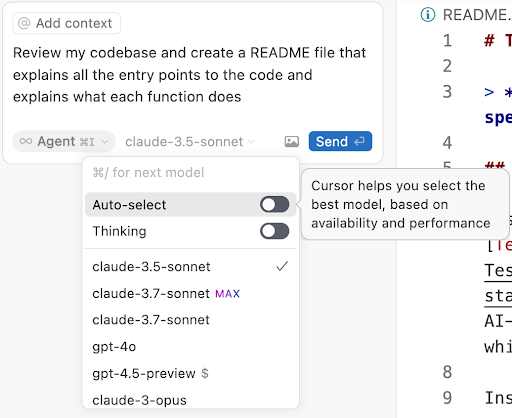 View full-size image: Cursor's model menu shows Claude 3.5 Sonnet selected, with other Claude and GPT models available. Auto-select can choose a model based on availability and performance.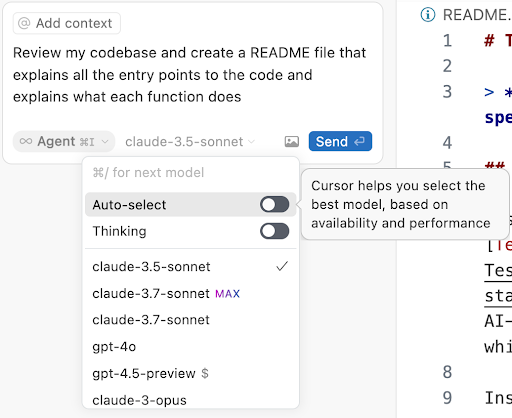
Screenshot of Cursor's chat interface that lets you pick from a variety of models
Midjourney - $30
Ah Midjourney my old friend. While OpenAI’s DALL-E introduced me to text-to-image generation, Midjourney took it to another level. Since I needed image generation for work at the time, I was happy to support them with the $30 monthly tier.
Since then, the landscape has evolved significantly. OpenAI, Gemini and Grok now offer impressive image generation bundled with their core service, eliminating the need for a separate subscription.
For the technically inclined, high-quality, open-sourced, local models like Flux on Pinokio offer good results without recurring costs.
If image creation is central to your workflow, Midjourney has a more accessible $10/month tier available.
Claude - $20
Anthropic’s Claude model is SOTA (State of the Art). The user interface design is pleasant to use. They offer both light and dark modes and even provide a dyslexia-friendly font. (note: dyslexia fonts have had a mixed history in terms of effectiveness)
Claude has earned widespread acclaim for its coding capabilities. They raised the bar with the release of Claude Code, a premium tool receiving stellar reviews from users willing to invest substantial sums, often $1000 or more, for the code generation they are getting out of Claude Code.
Here are the Claude Code installation instructions.
The only two limitations with Claude were the lack of an image generation model and integrated web search functionality. Well, they just launched Web Search and it works really well. With integrated web search becoming standard in LLMs, traditional Google searches feel increasingly obsolete. Personally, I find myself using Google only a couple of times per week.
ChatGPT - $20
While I could safely stop my OpenAI subscription and do quite well with the other LLMs I'm paying for, ChatGPT is the old classic. The one everyone knows. Even though I doubt they will ever reclaim their once undisputed #1 SOTA status, OpenAI often surprises us with innovative releases that keep them relevant in the rapidly evolving AI landscape.
My significant other isn't particularly interested in technology. She rolls her eyes whenever I encourage her to try out an AI tool. But the other day, while driving, she wanted to revisit the history of how Vietnam was tied into the creation of America’s nail salon industry.
Turning on ChatGPT's voice and handing her the phone, I watched her seamlessly engage in conversation throughout the rest of our drive. It was remarkable to witness ChatGPT Voice shift from a mere product into an intuitive conversation partner, far surpassing a traditional search experience. It felt like she made a new friend.
Perplexity - $20
I've had an on-again, off-again relationship with Perplexity.ai, recently scoring a free year through GitHub Universe. CEO Aravind Srinivas impresses me with his academic approach to hallucination prevention, as he shared on the Lex Fridman podcast—requiring every fact to be substantiated with a citation, much like rigorous research papers.
The reason I'm torn is that through friends I hear they are a crack team that knows how to execute. But the foundation models are torching web search, which was Perplexity's raison d'être. All the while, Perplexity's UI to surface their links is not too compelling. I still use it a lot, but it's too slow and a little off.
They're doing their best, throwing a bunch of spaghetti against the wall, from Perplexity Shopping to announcing they will match Manus.im feature for feature to the imminent release of a new browser. Will they find a new North Star? Or will the lack of focus take them out? I hope they find a business model.
Rewind - $19
Rewind immediately caught my attention as one of the most exciting AI products at launch. I’ve been using it for about a year. It records everything you do, letting you replay activities or search your history by keyword.
It’s fantastic and has saved me numerous times. But I’ll be honest, I often disable it to boost performance, and I rarely “rewind” anymore. Most of my work involves chats powered by an LLM, which already preserves my history. I’ll probably kill the subscription this week. Still, if you’re new to AI and want a good entry point, it’s a decent choice.
Google Gemini - about $10
Surprisingly, Google has found itself playing catch-up in AI, despite pioneering many foundational technologies. Google’s position might have been significantly weaker without Logan Kilpatrick’s contributions. Logan previously led developer advocacy at OpenAI, earning a strong reputation for responsiveness within the developer community.
It was a sad day when Logan left OpenAI, but once he transitioned to Google’s DeepMind team, there was a noticeable, immediate improvement in Gemini’s capabilities.
While Google Cloud can feel complex, they provide a user-friendly entry point through AI Studio, where Logan is leading product. His profile says he is "helping build the Gemini API into the best platform in the world for developers to build with AI."
Indeed, Studio gets better week after week. I used Talk with Gemini Live to pair program by sharing my screen. Gemini effortlessly analyzed my actions and retrieved exactly the data I needed. Truly magical.
Gemini is a workhorse. Their large context windows let you upload a ton of data while charging the lowest API rates of any AI. While Claude remains in the lead in terms of a coding LLM, when you have to hit the API yourself, Gemini is the best value.
As if to prove my point about Google Search being in the crosshairs of AI, before going to press with this newsletter, Google launched an experimental preview of "Ask Anything with AI Mode". I signed up for the waitlist, but the videos I saw looked like AI replacing search.
GitHub Copilot - $10
I’ve paid $10/mo on Copilot before it went free. GitHub invented the Copilot AI pair programmer and it was so successful they rebranded and remodeled their entire business model around it. Microsoft co-opted the name as well. Their free tier is very generous and if you aren’t already sold on AI coding, it costs literally nothing to start. Copilot is integrated with VSCode. I love their public commitment to accessibility including a recently published guide to using Copilot with a Screen Reader.
Grok - $2.67
Although many will avoid Grok for political reasons (Grok is X.com’s AI), it is impressive how quickly they went from 0 to 1 of the best AI models out there. Jensen Huang said they built a supercluster in 19 days. $44B was a lot of money to pay for Twitter, but the timing coincided with AI Crossing the Chasm. The type of data on X helps to create an LLM that does a good job with recent events. It still has a long way to go, but Grok can often answer questions I can’t find anywhere else.
🖼️ Image Generation
Speaking of image generation, everyone has their favorite test for the image models. Mine involves trying to get a good image of Wayne Gretzky dunking on Michael Jordan. The results have been quite mediocre until today. Most image gen pros spend a lot of time learning how to prompt image models and may do 1000 generations to get the perfect image they want. I’m only taking a few “shots” at it.
Until this morning with a brand new entrant, I couldn't get anyone to actually look like Wayne or Michael. DALL-E refuses to even accept the prompt without pushing back on known individuals. Grok surprised me because it happily generates images of recognizable individuals without restrictions. Here's a picture of Wayne off the prompt: "draw wayne gretzky".
 View full-size image: Grok portrait of a man resembling Wayne Gretzky, smiling in an Edmonton Oilers jersey.
Wayne Gretzky, smiling
Here are the results from OpenAI, Gemini and Grok, respectively:
 View full-size image: OpenAI illustration of a hockey player wearing number 99 dunking over a basketball player wearing 23, both on skates. The hockey player's left hand is missing.
Although a cool looking picture of a Hockey Player dunking on a basketball player, the quality is far from photorealistic
 View full-size image: Gemini image of a hockey player with a basketball jumping above a Bulls player holding a hockey stick. Both wear skates on an ice rink.
Gemini's picture is surreal and well done. But as expected the player's faces are generic
 View full-size image: Grok image of a hockey player holding a basketball near a hoop and a hockey stick in his other hand, while a Bulls player wearing number 23 looks up.
There are similarities to both Wayne and Michael in this spectacular image, but the likeness is still way off
Before going to press, a new smaller player entered the image generation game and I think it wins hands down. It was my favorite experience creating an image off a prompt and the result is spectacular. You can almost recognize Gretz and Mike. The company is called Reve.
 View full-size image: Reve image of a hockey player resembling Wayne Gretzky jumping above a Bulls player resembling Michael Jordan, with a basketball in one hand and a hockey stick in the other.
Reve produced a spectacular image of a Wayne Gretzkyish looking individual dunking over a Michael Jordan lookalike, with a priceless expression of shock on Michael's face
One more bit of news just happened before I hit send on this newsletter. OpenAI released 4o Image Generation. While it looks incredible, it seems that AI products move faster than the people who want to cover it can write.
📆 Upcoming Events
- NAB Show: I'm moderating a panel on AI's Potential to Revolutionize Accessibility.
- Global Accessibility Awareness Day (GAAD): GAAD is on May 15th this year. I’ve got 5 back to back keynotes planned already. It will be a whirlwind of a day. If you are running a GAAD event, please make sure to submit yours so we can help you get the word out!
- The GAADY Nominations are Open!: Know someone who should be recognized for building software with accessibility as a core value? Submit a nomination. The deadline is June 30, 2025.
Now I'd like to administer a test about this newsletter. Has anyone read all the way to the end? If so, find a subtle way to mention the number 42 when you get in touch.