JDOT #13: Karpathy Loop, Neurobots, and AI Tools

March 24, 2026
Tags:
Accessibility at CES and CSUN, Tailscale, the Karpathy Loop, context engineering, neurobots, and new AI tools.


Welcome back to Joe Dev on Tech. I'm 3 hours early to the airport because TSA, but the wait gave me time to finish this edition. Writing securely over airport Wi-Fi thanks to Tailscale, piped through my home NAS. More on that below.
In this edition:
- New Podcast Episode: Accessibility at CES with Verizon CAO Fred Moltz and CTA Executive Director Stephen Ewell
- How I AI: Trading ExpressVPN, iCloud and Google Drive for Tailscale & NAS
- CSUN 2026
- AutoResearch, and the Karpathy Loop
- Why Cursing at Your AI Makes It Dumber (and RLMs)
- Dr. Michael Levin's Neurobots
- Tool Corner
- AIMAC Updates
- Quick Hits
New Episode: Accessibility at CES
Episode 16 of the Accessibility and Gen AI Podcast is live! Eamon McErlean and I sat down with Verizon's Chief Accessibility Officer Fred Moltz and CTA Foundation Executive Director Stephen Ewell.
If you caught JDOT #9, you know that the CES Accessibility Stage was a big deal this year. Fred and Steve were the driving force behind it. In this episode, they share the story of how it came together, what happened on the stage, and where they're taking it next.
Watch on YouTube: Episode 16 with Fred Moltz of Verizon and Stephen Ewell of CTA Foundation
We will be filming Episode 17 with Repo Prompt creator, Eric Provencher, next.
How I AI: Trading ExpressVPN, iCloud and Google Drive for Tailscale & NAS
I wrote this edition from the airport with Tailscale and Wi-Fi. Tip of the hat to OpenClaw creator, Peter Steinberger, for highlighting how good this tool is.
Tailscale turns all your devices into one secure network, for free. My laptops, iPhone, home server can all see each other. I can log into any device from any other device. The setup was very easy.
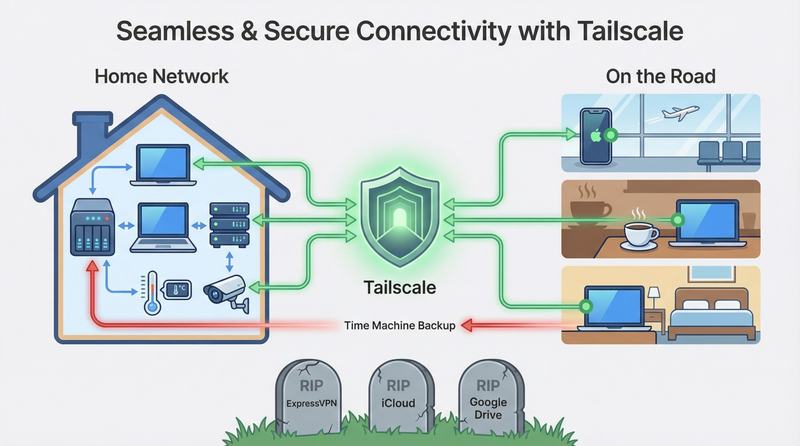 View full-size image: Infographic showing a home network with laptops, NAS,
servers, and a security camera connected through
Tailscale to remote devices on the road, including a
phone at an airport and laptops in a café and hotel
room. A red arrow labeled "Time Machine Backup" points
from the remote devices back to the home network.
View full-size image: Infographic showing a home network with laptops, NAS,
servers, and a security camera connected through
Tailscale to remote devices on the road, including a
phone at an airport and laptops in a café and hotel
room. A red arrow labeled "Time Machine Backup" points
from the remote devices back to the home network.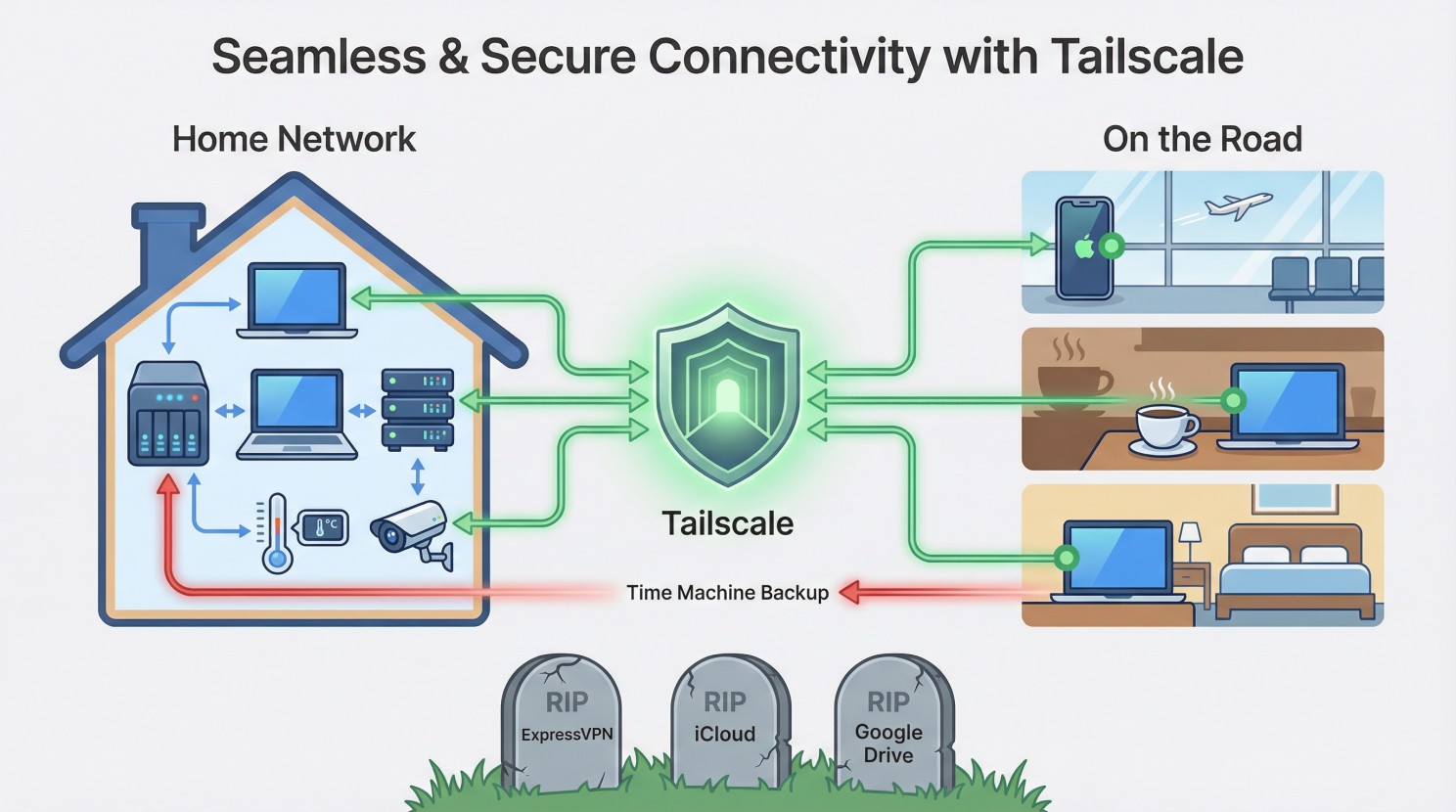
A free VPN you control. With Tailscale's exit node feature, all your traffic routes through a machine you trust, like your home setup. That means I'm doing encrypted browsing on public Wi-Fi so nobody on the network can sniff my traffic, hack my session, or deal with ad injection from shady ISPs.
As with any VPN, I can access geo-restricted content, and my streaming services only see traffic from my home IP, so no lockouts due to "too many locations" while traveling. And the best part is that Tailscale sees none of this traffic. The code is open source and has been vetted.
As you should know, it has repeatedly been proven that most 3rd party VPN providers that you are paying for, are logging your traffic. The exact opposite purpose of having a VPN. Especially problematic if you are in a Country run by dictators.
Your own cloud storage, no subscription. If you set up a NAS at home (Network Attached Storage, basically a personal hard drive on your network), Tailscale lets you access it from anywhere. That means your own version of Google Drive or iCloud, for free, on hardware you own. It works across any ecosystem: Mac, Windows, Linux, phone. And you don't lose your files if you have an accident and miss a payment for a month.
Time Machine backups on the go. I back up my laptops using Time Machine. Even though it's much slower over wifi, I can now backup my laptop on the road because I'm connected to my home network. In fact, it's backing up right now. So if you take a 2-week trip, you aren't at risk of losing the work you've done in the interim.
I wish I'd known about Tailscale years ago. Spent so much money on VPNs over the years because I love working from Coffee Shops who unfortunately often have insecure networks.
CSUN 2026
The 41st Annual CSUN Assistive Technology Conference wrapped up last week in Anaheim. This year felt different. The AI and accessibility conversations had real depth.
As usual the GAAD Foundation had an open house in partnership with Fable and this year we also added Perspective Tester as a sponsor. Chris Gaulin arranged some new GAAD Hockey Jerseys for us. I asked AI to merge two pictures, which it did. But it made my double chin even worse than it is. So I asked it to fix the double chin and below is the result:
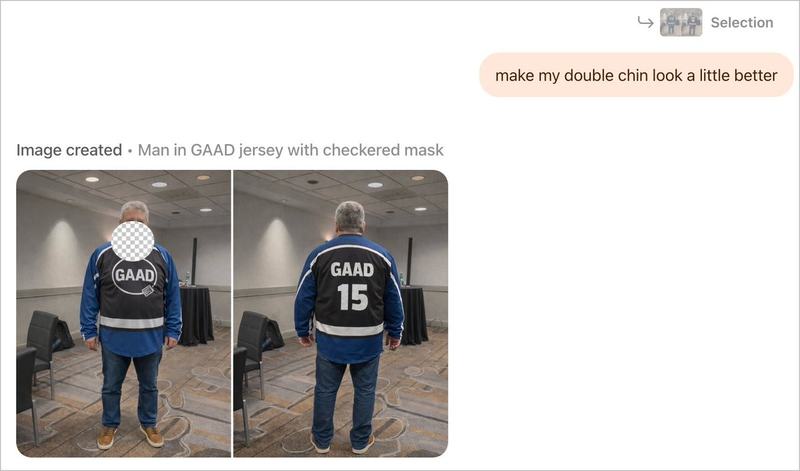 View full-size image: Screenshot of an AI chat showing a failed image edit: after the request "make my double chin look a little better," the generated image leaves the body and jersey intact but covers the whole face and chin with a checkerboard transparency grid.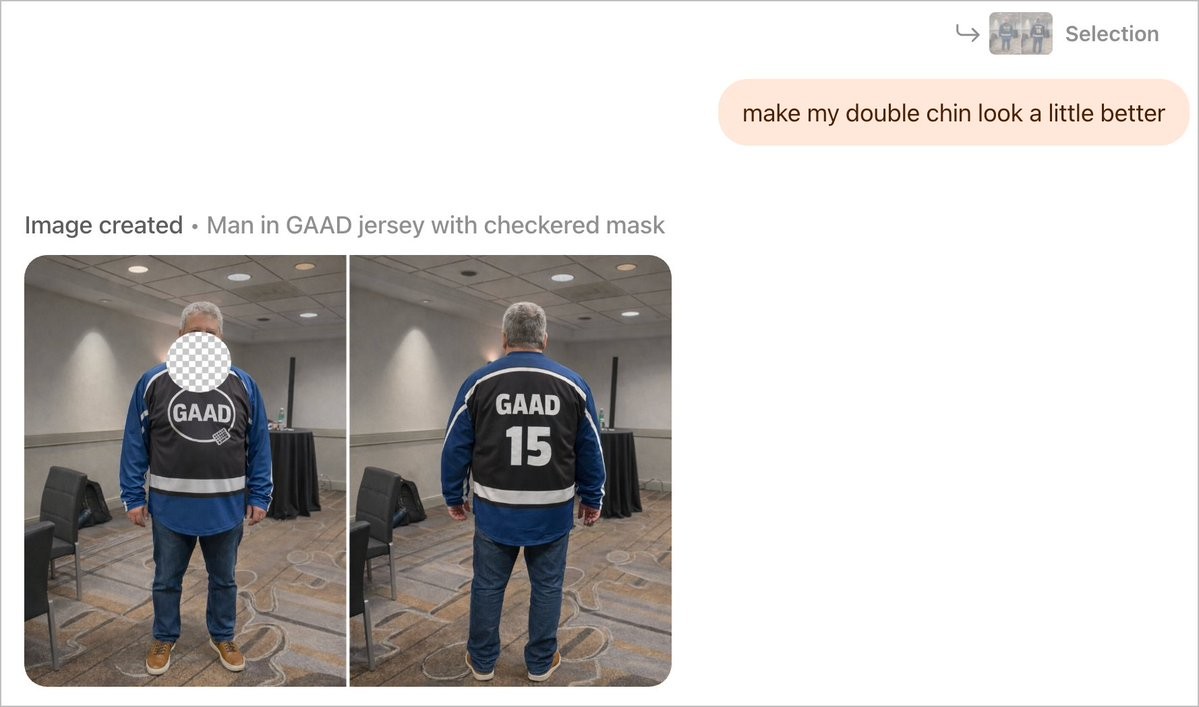
I thought it was funny so shared it above at the risk of embarrassment. So maybe we shouldn't worry about AI taking our jobs.
On the other hand, it's sacrilege to say what was whispered in the CSUN hallways, but I think folks will be surprised at how much of accessibility testing gets more automated in the next year. I've spoken with several major organizations who are working on it.
There are a handful of deep experts in both fields that attended. I was so happy to get a chance to speak to most of them. We may be able to get this done in a more open source way.
In fact, with my crazy mix of personal tooling built up over the last couple of years, the code my AIs are cranking out are already much more accessible. I'm in the middle of running a bake-off for a client's marketing site, to see which harness finds the most bugs. Ironically, it took a fair bit of work to figure out how to remove my personalized tooling from these systems to make it fair. Can't wait to see the results.
It's great that developers will have access to more accessibility tools. But it's unfortunate that CFOs will have more excuses to reduce accessibility budgets.
That said, I'm hoping that once we improve the tooling, we'll finally start to see much better results than we have so far, with ~95% of the Top Million homepages being inaccessible per the WebAIM Million Report and 72% of Mobile Apps with poor or failing grades, per the ArcTouch State of Mobile App Accessibility SOMAA Report.
Then as an industry, we can and should focus on solving deeper, more personalized, problems. Which brings us to Blake Watson.
Scroll my Mac: Assistive Technology FOR People with Disabilities BY PwD
There's a saying that the best software is created when a developer codes a solution that scratches their own itch. Blake Watson is a developer with a severe mobility impairment, spinal muscular atrophy. Here is a description of his "itch", in his own words:
"One of my biggest challenges -- aside from typing -- is the rather mundane act of scrolling. I'm unable to manipulate a scroll wheel or perform a swiping gesture. That means the usual methods for scrolling on a mouse or trackpad are out. The method I do use is probably something you haven't thought about in a long time -- I click on and drag the scrollbar."
Here's is a demo of what Blake's talking about as he uses Setapp by MacPaw, software I pay for and love as well:
Watch on YouTube: Disappearing scrollbar in Setapp
As an aside, I also HATE that some designers treat the scrollbar with disrespect, when it is a key requirement to navigate large pages. Recently I've been watching MacMost videos, which give you tips on maximizing your Mac settings. They offered this gem that will stop the Mac from making your scrollbars disappear.
Go to System Settings->Appearance, scroll to the bottom of the screen where you'll see "Show scroll bars", which provides 3 choices, "Automatically", "When Scrolling" and "Always". Pick "always" to keep it on the screen.
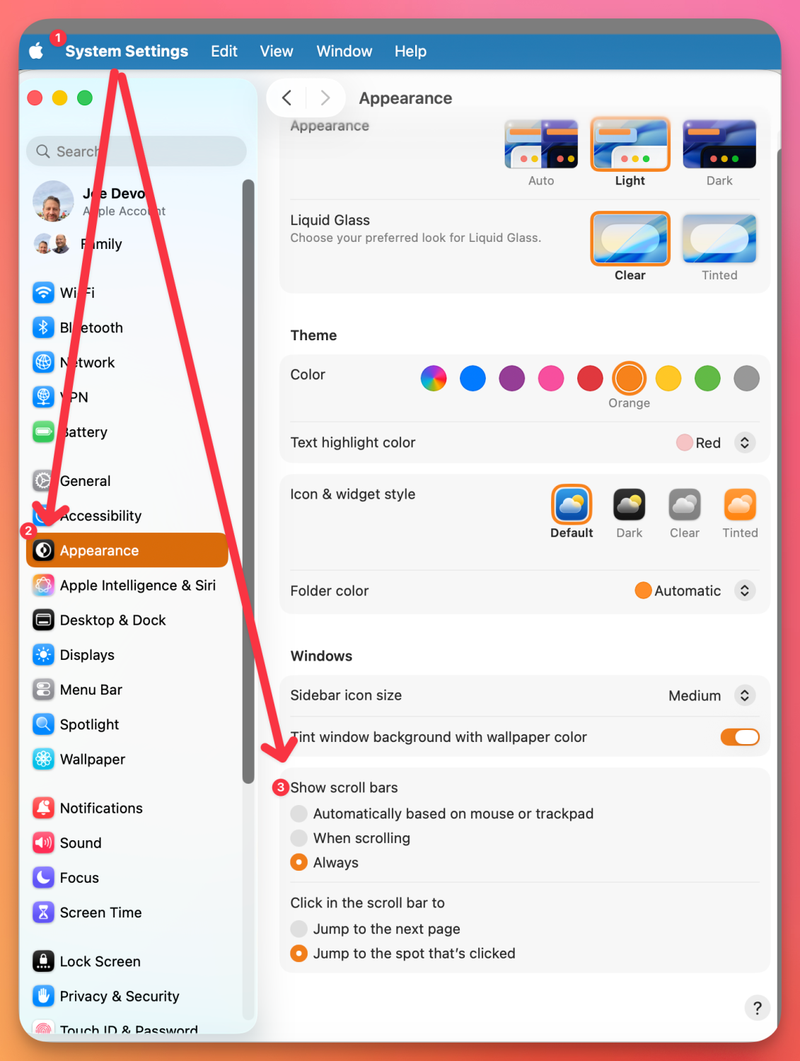 View full-size image: Annotated macOS System Settings screenshot showing how to make scroll bars always visible: open Appearance in the left sidebar, then under Windows select Show scroll bars > Always.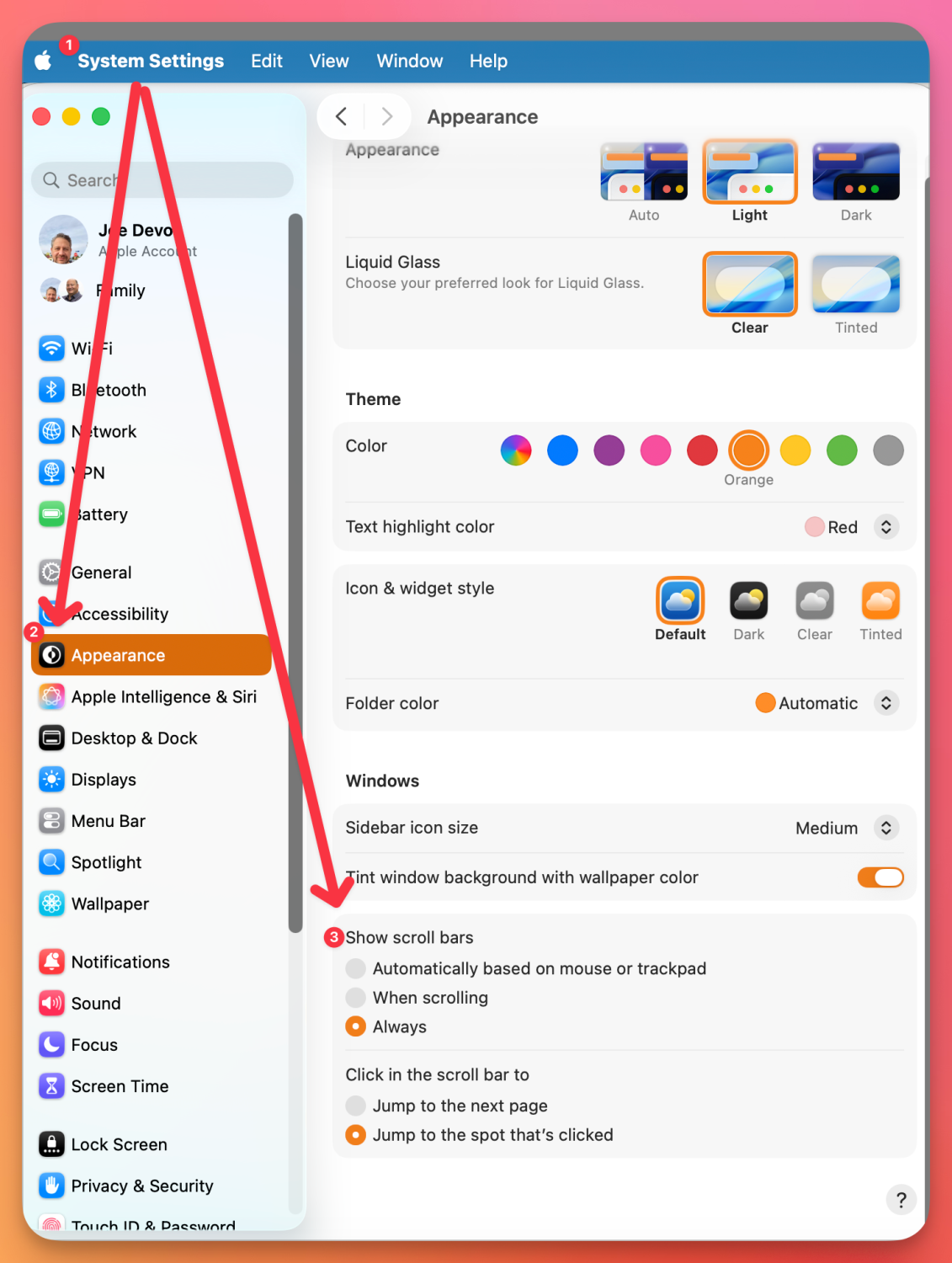
Blake spent ~8 hours with Claude Code to vibe engineer Scroll My Mac. It lets him scroll by clicking and dragging anywhere on the screen, the way you'd scroll on a phone. It works at the OS level, across every application. Keyboard shortcuts, adjustable hold delays, an excluded apps list.
Most people are not going to find this app useful. I get that. But it's incredibly useful for me and a handful of people I know who have tried it. -- Blake Watson
A person with a mobility impairment used AI to build the assistive technology that the industry never fully solved for him.
This is the version of AI I want to live in. The one where people who have been waiting decades for someone to solve their problem can finally solve it themselves.
AutoResearch, and the Karpathy Loop
Andrej Karpathy recently shared an effort he worked on called AutoResearch. He sat down with the No Priors podcast to discuss it. I clipped a blurb for you:
Watch on YouTube: AutoResearch clip from Andrej Karpathy's No Priors interview
AutoResearch is a 630 line open-source Python script that sort of automates the scientific method. An AI agent runs experiments in a loop, completely unsupervised, while you sleep.
Here's how it works:
- You give the agent one file it can modify and one metric to optimize
- The agent reads the code, forms a hypothesis ("what if I change the learning rate?"), edits the file, runs the experiment
- If the metric improved, keep the change. If not, revert
- Repeat. All night. Unsupervised.
At roughly 12 experiments per hour, you wake up to about 100 completed experiments. Karpathy ran it for two days and got through 700 experiments, finding about 20 improvements that stacked together for an 11% efficiency gain.
Fortune magazine coined the term "The Karpathy Loop" for the pattern, and it took off. Shopify CEO Tobias Lütke tried it on internal company data overnight, ran 37 experiments, and reported a 19% performance gain. No human touched the code.
As it went viral, the community has applied it well beyond ML training. GPU kernel optimization, marketing copy A/B testing and bundle size reduction. Since these are all quantifiable metrics, it was perfect for the loop. The human's job shifts from "doing the research" to "writing the program." Defining what to optimize, how to measure it, and what constraints to enforce.
If you have a problem you can quantify, this tool is worth investigating. It's driving me crazy because I haven't thought of an experiment to try it out on yet.
Why Cursing at Your AI Makes It Dumber (and What RLMs Do About It)
Emre Coklar made an excellent video breaking down why long conversations with LLMs get exponentially more expensive and progressively worse. I've understood this for a while, but never had the right way to explain it to others. Emre nailed it.
To put it simply, every token has to "pay attention" to every other token. 10,000 tokens requires 100 million computations. Double the tokens to 20,000 and you need 400 million computations. Triple it to 30,000 and you're at 900 million.
Double the text, quadruple the cost. Triple the text, 9x the cost.
Every token you send reprocesses the entire conversation history leading to context rot.
But there's a second problem. LLMs contain the latent space of written human knowledge. When you prompt them, you are activating a network of words that we use to understand a topic while stripping away everything else.
Every time you curse at your AI out of frustration, you're tapping into the latent space of every frustrated person who has ever rage-typed into the internet. You're activating the mindset of losers. You're steering the model towards creating that will fail.
Think about that the next time you tell your AI to "Eff Off".
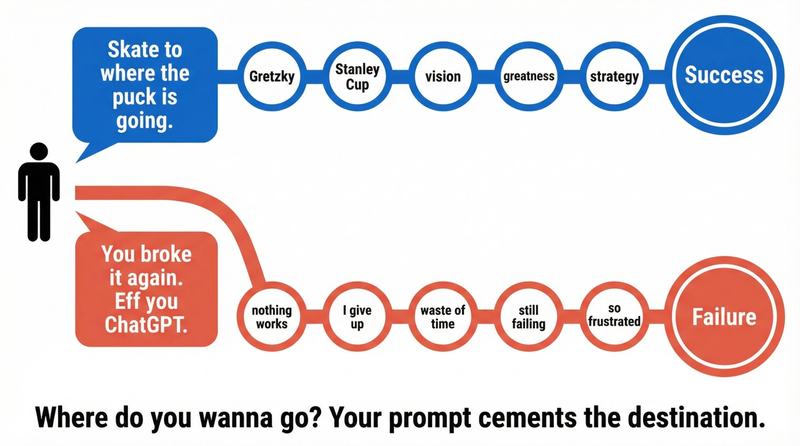 View full-size image: Diagram showing two possible outcomes based on prompting.
The top blue path begins with "Skate to where the puck is
going." and passes through circles labeled "Gretzky,"
"Stanley Cup," "vision," "greatness," and "strategy" to
"Success." The bottom red path begins with "You broke it
again. Eff you ChatGPT." and passes through "nothing
works," "I give up," "waste of time," "still failing,"
and "so frustrated" to "Failure." Text at the bottom
reads: "Where do you wanna go? Your prompt cements the
destination."
View full-size image: Diagram showing two possible outcomes based on prompting.
The top blue path begins with "Skate to where the puck is
going." and passes through circles labeled "Gretzky,"
"Stanley Cup," "vision," "greatness," and "strategy" to
"Success." The bottom red path begins with "You broke it
again. Eff you ChatGPT." and passes through "nothing
works," "I give up," "waste of time," "still failing,"
and "so frustrated" to "Failure." Text at the bottom
reads: "Where do you wanna go? Your prompt cements the
destination."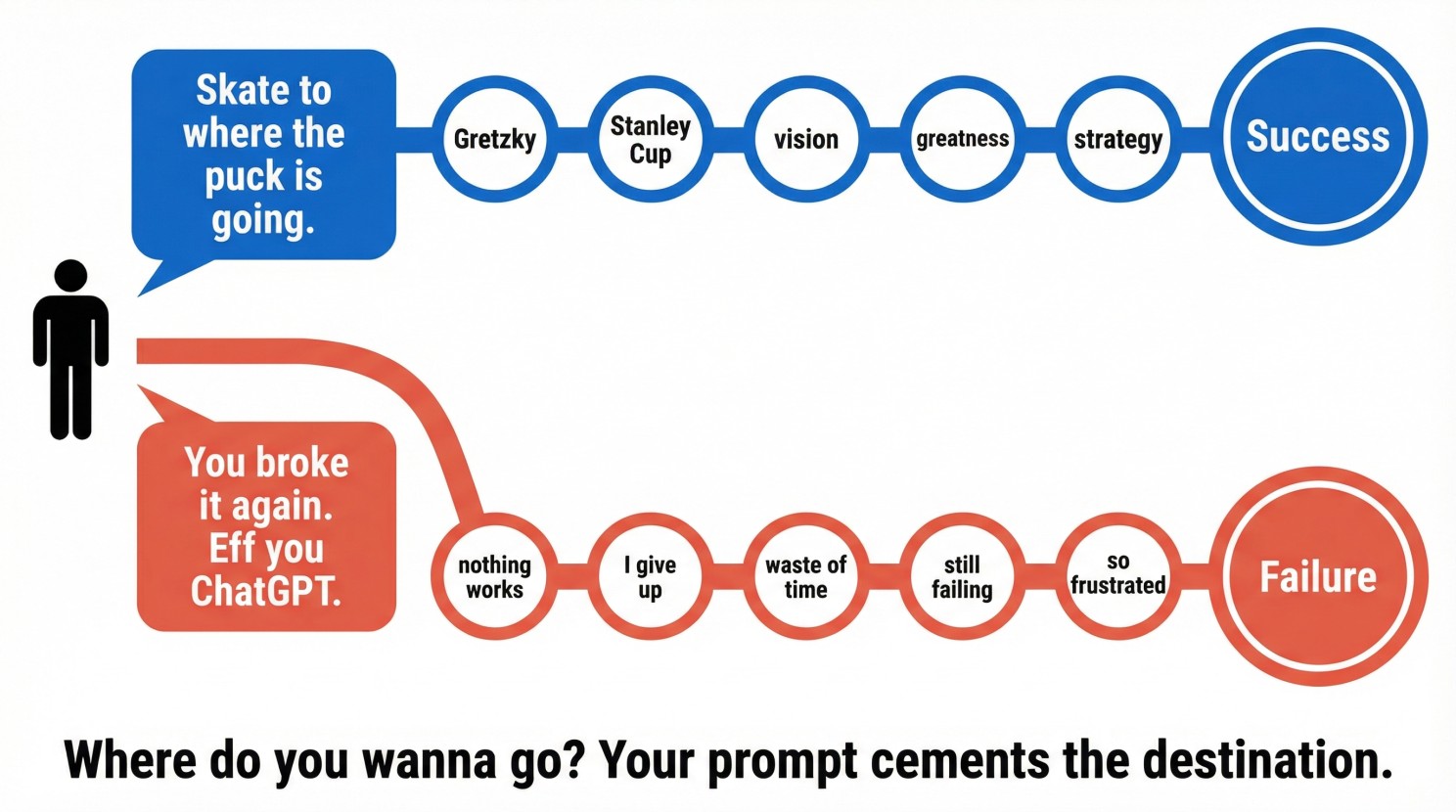
Why This Matters for Context Engineering
Context rot from long chats and quality degradation from poor prompting are exactly what context engineering solves. And that's why I'm excited about our upcoming podcast with Eric Provencher, creator of Repo Prompt.
Repo Prompt's approach is to curate exactly the right context before sending it to the model, rather than letting the model wade through everything. Send precisely what matters. Keep the context window clean. The model stays in the productive region of its latent space instead of drowning in accumulated noise.
Recursive Language Models (RLM)
Recursive Language Models from Omar Khattab (ColBERT, DSPy) and Alex Zhang at MIT attack the context problem from yet another angle.
Instead of shoving your entire document into the AI and hoping it pays attention to the right parts, RLMs let the AI treat its own input like a searchable database. The AI writes small programs to look up, filter, and summarize just the pieces it needs, then combines those results into a final answer. Picture a manager who, instead of reading an entire 300-page report cover to cover, sends research assistants to pull the relevant sections, then summarizes their findings.
The results are impressive. A smaller, cheaper model using the RLM approach outperformed a much larger model on difficult long-document tasks by over 114%. And it can handle inputs up to 10M+ tokens, two orders of magnitude beyond the model's native context window.
Watch Emre's video and the RLM theory overview by Alex Zhang. Between those two videos and Eric's upcoming podcast episode, you'll have a solid grasp of why context management is the skill that separates productive AI users from frustrated ones.
Dr. Michael Levin's Neurobots
Regular readers know I follow Dr. Michael Levin's work closely. In JDOT #6, I called his research "the only topic that is more exciting and important than AI today." I stand by that.
His lab just published something extraordinary. They created "neurobots," tiny living constructs made from frog embryo skin cells with implanted nerve cell precursors, and watched as those cells grew their own primitive nervous system without a blueprint or body plan produced by evolution. The neurons self-organized, extending connections to each other and to the surface cells entirely on their own.
The paper is published in Advanced Science.
Tool Corner
VisionScribe Update
I updated my custom GPT called VisionScribe. Give it an image, get a first draft of alt text or audio description. You should always review and customize the output, but I've been using it for over a year and rarely need to edit much. I've refined the prompts to produce tighter, more contextual descriptions. Once you add the Custom GPT, all you have to do is tag it @VisionScribe and upload an image.
Chrome DevTools MCP: Lighthouse Accessibility in Your Terminal
The Chrome DevTools team released an official MCP (Model Context Protocol) server that lets AI coding assistants like Claude Code control Chrome DevTools directly. They include Lighthouse audits, on demand, in your AI workflow. Instead of switching to Chrome, opening DevTools, running an audit, copying results, and pasting them back into your editor, you ask your AI assistant to audit a page and get WCAG violations reported directly in your terminal.
Hermes Agent: The New OpenClaw Alternative
Nous Research's Hermes Agent just hit 10,000 stars on GitHub and grew 20-28x in usage on OpenRouter in about three weeks. It's an open-source agent framework for orchestration, tools, and memory.
People are running it on home labs alongside Claude Code and specialized workers for research, automation, and file management. Worth keeping on your radar if you're building agent workflows and want full control.
AIMAC Updates
Since the last JDOT, we made two updates with new models to AIMAC, our AI accessibility benchmark.
OpenAI dominates. Three models now achieve a median AIMAC Debt of 0.00, holding spots #1 through #3. GPT 5.3 Codex is in first place.
xAI's new flagship flopped. Grok 4.20 Beta lands at #40. Its own older Grok 4.1 Fast sits at #18.
Many model upgrades keep regressing on accessibility. MiniMax M2.7 replaced M2.5 and dropped from #9 to #23. Mistral Small 4 finished dead last.
Quick Hits
- Cursor's Kimi problem. Cursor shipped "Composer 2" as their own model. Within 24 hours, the community found the API was leaking a model ID of kimi-k2p5-rl-0317. Moonshot AI's open-source Kimi K2.5 with RL fine-tuning. Moonshot had to publicly announce their involvement to get credit. Cursor co-founder Aman Sanger called it "a miss."
- Pinokio 7 dropped (March 17). Pinokio is a free desktop app that lets you install and run open-source AI tools with a single click. It's like an app store for local AI. Version 7 has a new "Interpreter" feature that lets any AI agent automatically discover, launch, and control any app installed in Pinokio.
- Lex Fridman x Jensen Huang podcast just dropped. A 3+ hour conversation with the NVIDIA CEO. If you care about where AI hardware, infrastructure, and the broader industry are heading, this one is worth your time.
Did you make it to the end? Work the phrase "double chin" into the comments and I'll know you did. Bonus points if you tell me which tool from this edition you're going to try first.